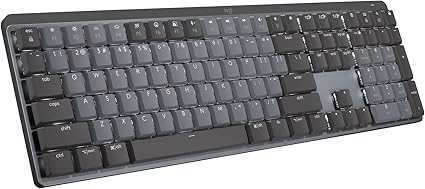
Logitech MX Mechanical Wireless Keyboard Review
Logitech MX Mechanical Wireless Illuminated Performance Keyboard, Clicky Switches, Backlit
Logitech's MX Mechanical pairs the right tactile switches with multi-device wireless and backlight. The right keyboard for traders working long sessions.
- Clicky low-profile mechanical switches
- Backlight lights up as hands approach
- Pairs with 3 devices via Bluetooth or Bolt
We may earn a commission if you make a purchase through our links.
Pros
- Clicky low-profile mechanical switches
- Backlight lights up as hands approach
- Pairs with 3 devices via Bluetooth or Bolt
- Up to 15 days per charge, USB-C quick charge
Cons
- Backlight on cuts battery to about 15 days
- Clicky switches are audible by design
TL;DR
The Logitech MX Mechanical is a low-profile mechanical keyboard with clicky tactile switches, multi-device wireless (Bluetooth + Logi Bolt), backlit keys with proximity-sensing, and the build quality Logitech reserves for its MX line. For traders running long sessions across multiple devices and platforms, it hits a sweet spot: tactile feedback that feels good for thousands of keystrokes per day, multi-device pairing for laptop/desktop switching, and a backlight that adapts to ambient light.
Why It Matters
Full-day traders type orders, notes, and rapid platform commands constantly. The keyboard isn't a luxury — it's a tool that affects fatigue, error rate, and execution speed. A good mechanical with the right switch keeps you fresh; a wrong-feeling membrane keyboard wears on you across a session.
Key Specs
- Type: low-profile mechanical
- Switches: tactile clicky (also tactile quiet, linear options)
- Wireless: Bluetooth + Logi Bolt USB receiver
- Multi-device: pair up to 3 devices, switch via dedicated keys
- Backlight: per-key, adapts to ambient light, hand-proximity wake
- Battery: rechargeable, ~15 days backlit / 5 months unlit
- Layout: full-size or TKL options
Pros
- Low-profile mechanical feel — tactile without being tall
- Multi-device pairing is genuinely useful for hybrid workstations
- Backlight ambient sensing reduces fatigue at dawn/dusk trading
- Build quality is premium — heavy chassis, no flex
- Logi Flow + multi-OS support pairs with Mac, Windows, Linux
- Battery life is excellent
Cons
- Not user-replaceable switches (purists prefer hot-swappable)
- Clicky variant is loud — bothers anyone in the same room
- Pricier than mainstream mechanicals
- Logi Bolt receiver takes a USB port (or use Bluetooth)
- Low-profile feel divides opinion — some traders prefer full-height
Who It's For
Traders running multi-device setups (desktop + laptop). Anyone who types 6+ hours daily and feels the keyboard. Mac/Windows/Linux users wanting one keyboard to switch between. Skip it if you prefer hot-swappable custom mechanicals or full-height switches, or if you trade in a shared room (clicky is loud).
How to Use It
Pair all relevant devices on the three numbered slots. Set the backlight ambient sensitivity. Map Easy-Switch keys to your most-used devices. Use Logi Options+ for per-app key remapping if you want different shortcuts per platform. Charge weekly via USB-C.
How It Compares
Vs. Logitech MX Keys (membrane): MX Mechanical adds the tactile feel; MX Keys is quieter and flatter. Vs. Keychron K2 HE / similar mechanicals: Keychron is hot-swappable and customizable; MX Mechanical is more polished, less moddable. Vs. full-height gaming mechanicals: low-profile is friendlier to long sessions.
Bottom Line
The right premium wireless mechanical for traders. Buy it for multi-device daily-driver use. Skip it for hot-swap purists or quiet shared spaces.
Check the latest price on Amazon →
Pairs perfectly with: the Logitech MX Master 3S mouse — same MX ecosystem, same multi-device switching via Logi Options+.
Top 10 Brokers Comparison Chart
Side-by-side PDF comparing commissions, margin rates, platform features, and account minimums for the top 10 brokers. Updated quarterly.
Save hours of research
Instant download. No spam. Unsubscribe anytime.
Affiliate Disclosure
Discussion
Sign in with GitHub to leave a comment. Your replies are stored on this site's public discussion board.